Windows will show a warning the first time you run the installer. That's expected, and we want to be upfront about why. Here's a 60-second read so you know what's happening and exactly what to click.
Free version. 300-message limit. No card required.
ChatXport is a small, independent app built by The Baobab Collective Ltd in Nairobi. We're new, and Windows reasonably treats new publishers cautiously until they've been downloaded by enough users for Microsoft's reputation system to recognise them.
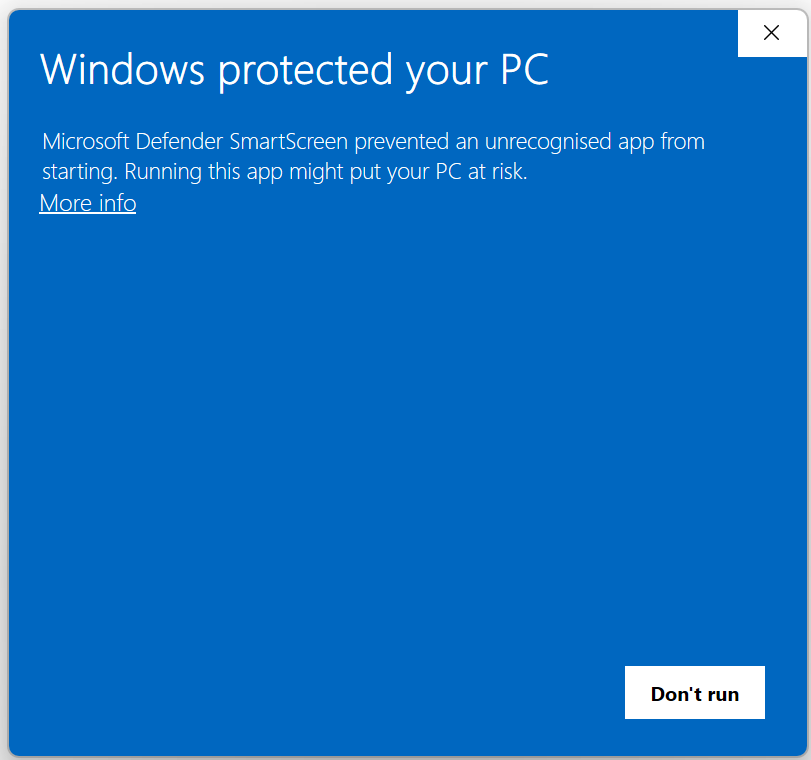
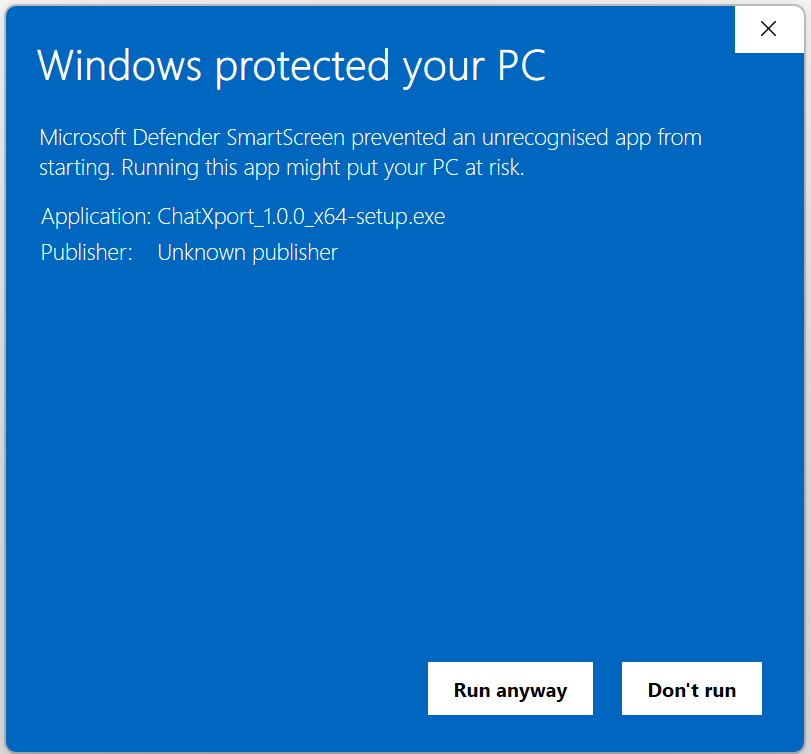
That means when you double-click the installer, you'll see a blue "Windows protected your PC" screen from a service called Microsoft Defender SmartScreen. It looks alarming, but it's the same warning every new app gets. It's not telling you ChatXport is dangerous. It's telling you Windows hasn't built a reputation for ChatXport yet.
As more people install ChatXport without issues, the warning quietens for new users automatically. We'll also be moving to a fully signed installer once we have enough early customers to justify the certificate cost.
Two states of the same dialog. Click "More info" on the first, then "Run anyway" on the second.
Total time: under a minute.
You'll get ChatXport_1.0.0_x64-setup.exe from your purchase email or the download page. Save it somewhere you can find it. Your Downloads folder is fine.
Windows will pause and show "Windows protected your PC". This is the SmartScreen warning we talked about above. Click the small "More info" link, then click the "Run anyway" button that appears.
From this point on it's a normal Windows installer. Pick where to install, click Next, click Finish. ChatXport opens. You're done.
ChatXport runs 100% offline. The installer doesn't phone home, doesn't track you, and doesn't upload your data. The only network call ChatXport ever makes is to verify your licence key with Gumroad if you upgrade. That's it.
Yes. The SmartScreen warning isn't a virus alert. It's a "we don't know this publisher yet" alert. We're being transparent about it because we'd rather you understand what you're seeing than rush through it. ChatXport runs entirely on your device, makes no network calls except to verify your licence key, and was built by a real small company you can email any time at hello@chatxport.com.
We will. Code-signing certificates cost between $200 and $500 per year, and as a small independent team we're prioritising getting ChatXport into your hands before that expense. As soon as early customers make the certificate sustainable, we'll add it and the SmartScreen warning will quieten further. We promised ourselves we wouldn't pretend to be bigger than we are.
Each new version starts its reputation from zero in SmartScreen's eyes. As we ship more releases, you'll see the warning less often. Within a few releases of you regularly using the app, it usually stops showing entirely on your machine.
Just double-click the installer again. SmartScreen will show the same warning. This time, click "More info" first. The "Run anyway" button only appears after that step.
Some heuristic-based antivirus tools flag any unsigned binary as a precaution. It's a false positive based on the lack of a code signature, not on anything ChatXport actually does. If that happens, please email hello@chatxport.com with the antivirus name and the message you saw. We'll explain the situation and add your AV vendor to the list of partners we work with directly to clear ChatXport.
The default installer requires admin rights because it installs to Program Files. If you're on a managed machine without admin access, email us and we'll send a portable build that runs from any folder.
Start with the free version. 300-message preview, no card required. Upgrade to Personal or Pro from inside the app whenever you're ready.
If something on this page didn't help, we want to know. Email us with your Windows version and a screenshot of what you saw, and we'll write back within 24 hours.
hello@chatxport.com ChatXport